Double-Sided Printing: Long Edge vs Short Edge Explained | TuaStampa
Complete guide with diagrams to choose between long edge and short edge
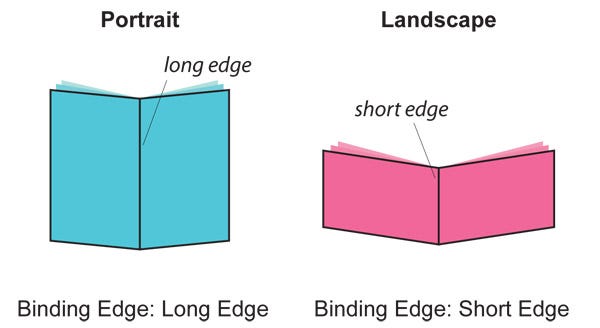
Double-sided printing: long edge vs short edge explained
When ordering double-sided printing online, you need to choose between two flip options: long edge and short edge. This setting controls where the page flips, which determines the binding position. Picking the wrong one means your back pages print upside down — a common mistake this guide will help you avoid.
What do "long edge" and "short edge" mean?
The long edge is the longer side of the sheet (29.7 cm on a portrait A4). The short edge is the shorter side (21 cm on a portrait A4). When you select long edge duplex printing, the paper flips along the longer side. When you select short edge, it flips along the shorter side.
The 4 possible combinations
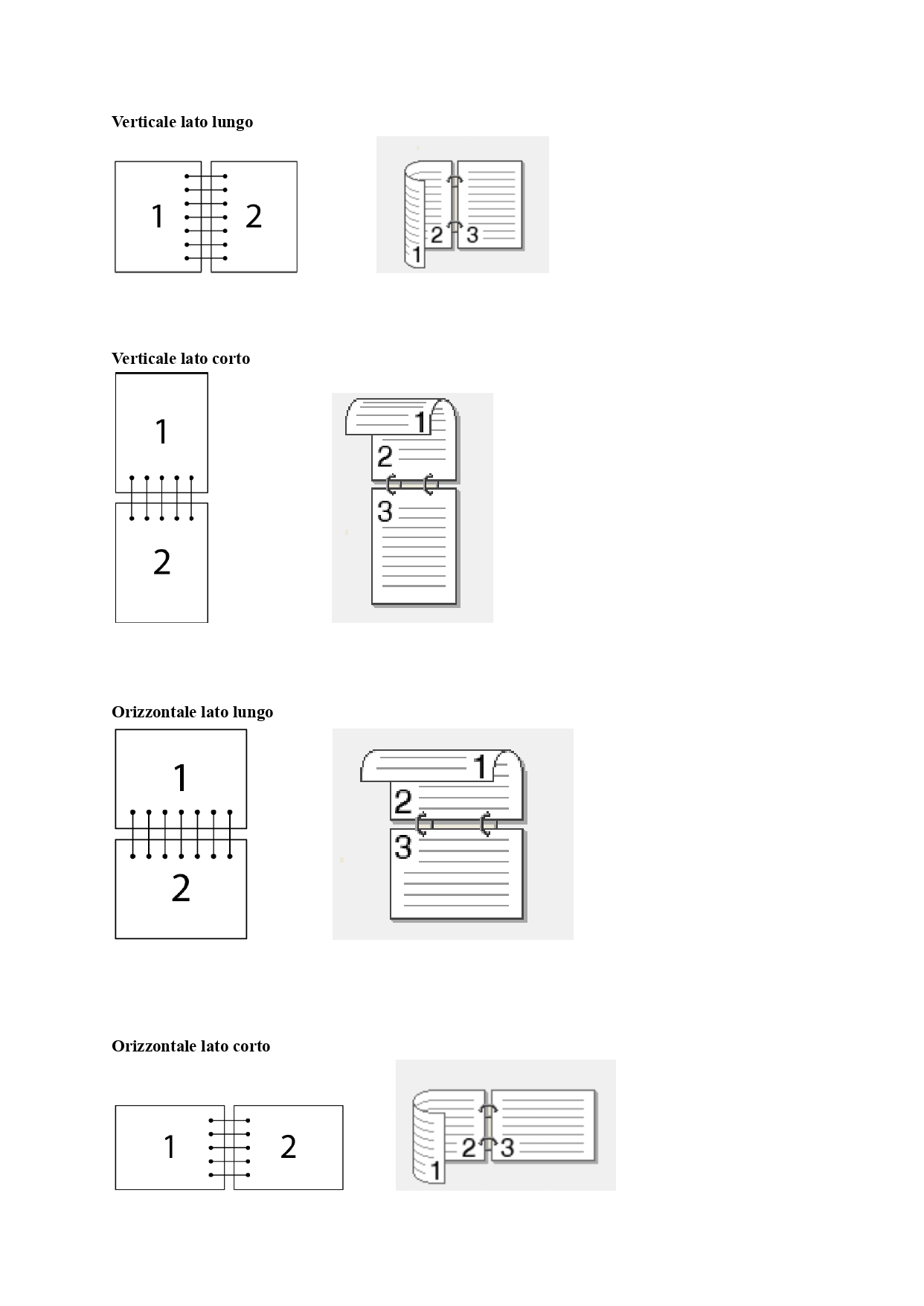
There are four combinations of page orientation and flip direction. The image below illustrates all of them:
Portrait documents
- Long edge binding: pages flip like a book, with binding on the left side. Best for theses, reports, contracts, and reading documents.
- Short edge binding: pages flip upward, with binding on the top edge. Ideal for calendars, notepads, and tabletop presentations.
Landscape documents
- Long edge binding: pages flip upward, with binding on the bottom edge. Perfect for horizontal presentations and brochures.
- Short edge binding: pages flip like a book, with binding on the right side. Used for horizontal manuals and catalogues.
Which option should you choose? Quick guide
The simplest rule to remember:
- Portrait document (A4 upright)? → Choose long edge. Pages flip like a book.
- Landscape document (A4 sideways)? → Choose short edge. Pages flip like a book.
In both cases, the goal is for the back of each page to read in the same direction as the front.
Other factors to consider
- Binding type: for spiral binding you can choose either long or short edge, but check which side you want the holes on.
- Double-sided PDF printing: before uploading your file, verify the orientation in your PDF settings. If the document mixes portrait and landscape pages, it is best to standardise the orientation before printing.
- Test with a sheet: if in doubt, take an A4 sheet and fold it in half along the long edge, then the short edge. You will immediately see the difference in reading direction.
Order double-sided printing on TuaStampa.it
On TuaStampa.it you can order double-sided printing of your documents in just a few clicks. Upload your PDF, select "double-sided" and choose between long edge or short edge. Printing is done with professional laser printers, and delivery is available throughout Italy. For orders over €49, shipping is free.
Share the article


Ordina anche dalla nostra App!